Shipping Anchor: A Self-Hosted Bookmark Vault, Deployed on Cloudflare Workers
Anchor is a bookmark manager I've been building on the side — paste a link, it scrapes the title/description/favicon automatically, you organize it into folders and tags, link it to notes, and see your whole vault as a connected graph instead of a flat list.
This post is about the last stretch of that work: a full homepage redesign, and then deploying the real app — not a static export, the actual Next.js server with API routes and auth — to Cloudflare Workers. That second part broke in three genuinely different ways before it worked, and each one taught me something I hadn't run into before.
Live: anchor.dolphinlab.site · Source: github.com/Meesujit/Anchor

Stack
| Layer | What |
|---|---|
| Framework | Next.js 16 (App Router, Turbopack) |
| Backend | Supabase — Postgres + Auth |
| Graph view | @xyflow/react (React Flow) + elkjs for auto-layout |
| Motion | Framer Motion |
| Metadata scraping | metascraper (title/description/favicon from any pasted URL) |
| Hosting | Cloudflare Workers, via the OpenNext adapter |
| CI/CD | GitHub Actions → auto-deploy on push to main |
The Graph View
The part of Anchor I like most: every bookmark and every note you link to it gets laid out automatically as a graph, not a list.
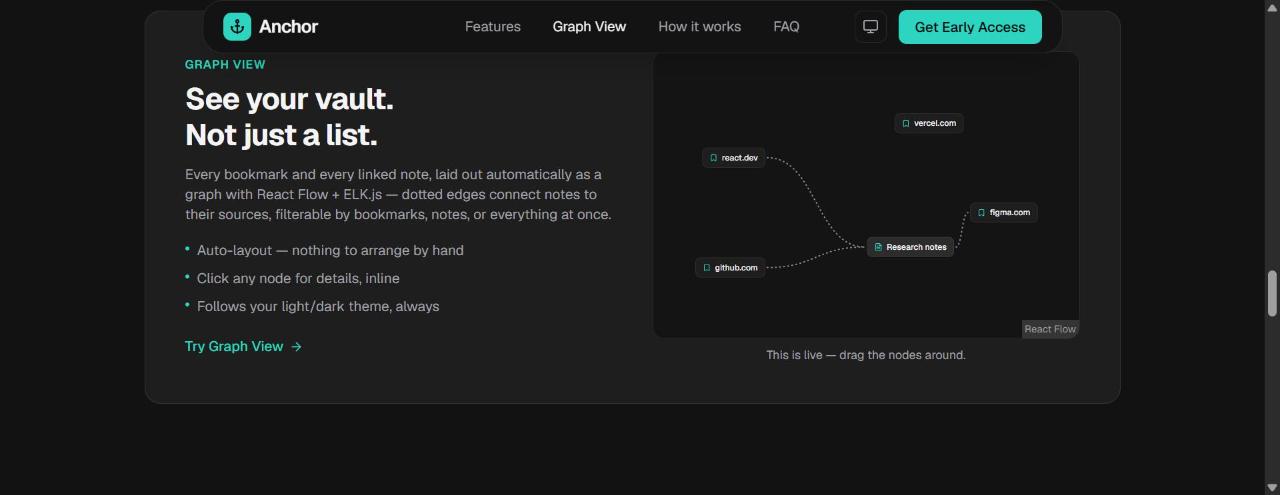
It's a real @xyflow/react instance, not a screenshot standing in for one — elkjs handles the auto-layout so nothing needs manual arranging, and dotted edges connect notes to the bookmarks they reference. I used the same real graph component on the homepage as a live, draggable preview — visitors can actually drag the nodes around before signing up, which felt more honest than a static mockup of a feature that already exists.
Deploying the Real App to Cloudflare Workers
Most "deploy Next.js to Cloudflare" writeups mean a static export, or Cloudflare Pages with limited API route support. I wanted the actual thing — SSR, API routes, auth, all of it — running as a Worker. That's what OpenNext is for:
npm install -D @opennextjs/cloudflare wranglerTwo files:
// wrangler.jsonc
{
  "main": ".open-next/worker.js",
  "name": "anchor",
  "compatibility_date": "2026-10-05",
  "compatibility_flags": ["nodejs_compat", "global_fetch_strictly_public"],
  "assets": { "directory": ".open-next/assets", "binding": "ASSETS" },
  "services": [{ "binding": "WORKER_SELF_REFERENCE", "service": "anchor" }]
}
// open-next.config.ts
import { defineCloudflareConfig } from "@opennextjs/cloudflare";
export default defineCloudflareConfig();Then:
npx opennextjs-cloudflare build && npx opennextjs-cloudflare deployThat builds the normal Next.js output, adapts it into a Workers-compatible bundle, and ships it. First build failed immediately:
X [ERROR] No loader is configured for ".node" files:
node_modules/re2/build/Release/re2.node
The re2 Saga
re2 is a native addon — a compiled C++ regex engine — pulled in transitively by metascraper-description's url-regex-safe dependency, for faster/safer URL matching. esbuild, which OpenNext uses to bundle the Workers server, has no loader for .node binary files. Hard fail, every time.
The good news: url-regex-safe already wraps its require('re2') in a try/catch and falls back to plain RegExp if it's not available:
const SafeRegExp = options.re2 && hasRE2 !== false
  ? (() => {
      try {
        RE2 = require('re2');
        return typeof RE2 === 'function' ? RE2 : RegExp;
      } catch {
        hasRE2 = false;
        return RegExp;
      }
    })()
  : RegExp;
So I didn't need re2 to actually work — I just needed it to not exist in a way esbuild could choke on. First attempt: npm's overrides field, pointing re2 at a local two-file stub package:
"overrides": { "re2": "file:./vendor/re2-stub" }Build passed locally. Pushed it, GitHub Actions failed:
npm error Cannot read properties of null (reading 'name')
Turned out npm was writing a broken nested lockfile entry for the copy of re2 living under @metascraper/helpers — a "resolved" path that pointed at a location that was never actually created on disk. Reproducible from a clean install every single time, but tolerated by npm on Windows and not tolerated by the same npm major version on the Linux CI runner. I tried nested overrides entries scoped to the specific parent package, tried matching the stub's declared version to the real package's peer-dependency range — nothing fixed the lockfile corruption itself.
The actual fix: stop asking npm to resolve a file: override at all. Let re2 install for real, through npm's completely normal registry path, then neutralize it after install with a postinstall script:
// scripts/stub-re2.js
const pkgPath = require.resolve("re2/package.json");
const pkgDir = path.dirname(pkgPath);
const pkg = JSON.parse(fs.readFileSync(pkgPath, "utf8"));
const entry = path.join(pkgDir, pkg.main || "index.js");

fs.writeFileSync(entry, "module.exports = {};\n");"scripts": { "postinstall": "node scripts/stub-re2.js" }Same end result — url-regex-safe sees a non-function, falls back to RegExp — but reached without ever touching npm's override resolution. Clean, ordinary lockfile entry. npm ci passed on both platforms on the first try after that.
Three attempts, three different failure modes, before I had a fix that was actually robust rather than "works on my machine."
The Supabase Redirect URL Gotcha
Once the Worker was live, GitHub login redirected users to a dead localhost:3000/?code=... URL. The GitHub OAuth exchange itself worked fine — the problem was one layer downstream.
Supabase only honors a redirectTo you pass to signInWithOAuth() if it's in the project's Redirect URLs allow-list. If it isn't, Supabase silently falls back to whatever Site URL is configured instead — which was still http://localhost:3000 from local development. The fix is a two-minute dashboard change (Auth → URL Configuration → add the production domain to both Site URL and Redirect URLs), but the symptom — a real, successful auth exchange landing on a completely dead page — took a minute to place, since nothing in the app's own code was wrong.
Worth remembering: every time the production domain changes, that allow-list needs updating too. It bit me twice in one afternoon — once for the workers.dev default URL, once again for the custom domain.
CI/CD
# .github/workflows/deploy.yml
on:
  push:
    branches: [main]
jobs:
  deploy:
    runs-on: ubuntu-latest
    steps:
      - uses: actions/checkout@v4
      - uses: actions/setup-node@v4
        with: { node-version: 24, cache: npm }
      - run: npm ci
      - run: npm run cf:deploy
        env:
          CLOUDFLARE_API_TOKEN: ${{ secrets.CLOUDFLARE_API_TOKEN }}
          NEXT_PUBLIC_SUPABASE_URL: ${{ secrets.NEXT_PUBLIC_SUPABASE_URL }}
          NEXT_PUBLIC_SUPABASE_ANON_KEY: ${{ secrets.NEXT_PUBLIC_SUPABASE_ANON_KEY }}
Every push to main now builds and deploys on its own. The Cloudflare API token only needs the "Edit Cloudflare Workers" scope — no DNS or zone access required, since the token never touches anything but wrangler deploy.
What's Live
- Full-bleed aurora hero that shows through a transparent nav, which morphs into a floating rounded-2xl capsule on scroll
- A real, draggable React Flow graph as both the actual Graph View feature and the homepage preview of it
- Auto-fetched metadata on every pasted link, nested folders, colored tags, notes linked to bookmarks
- Light/dark/system theme throughout
- Auto-deploy on push, running on Cloudflare's own infrastructure instead of a third-party PaaS
The native-addon bundling issue and the auth redirect gotcha both felt like exactly the kind of problem that looks like it should have a one-line fix and doesn't — the real fix in both cases was one layer away from where the error actually surfaced. That's usually where the useful debugging is.